Best AI Tools for Small Business Owners in 2026: Save Time, Cut Costs & Grow
Running a small business means wearing many hats. You handle marketing, customer messages, product listings, social-media posts, invoicing, content creation, and day-to-day operations — often by yourself or with a tiny team. In 2026, AI tools for small business owners have become practical assistants that help with the repetitive, time-consuming tasks so you can focus on what actually grows your business.
AI is not a magic solution that replaces hard work or business strategy. Instead, it is a set of tools that can help you draft content faster, organize your workflow, generate product-image concepts, respond to customer queries, plan marketing campaigns, and handle basic administrative tasks more efficiently.
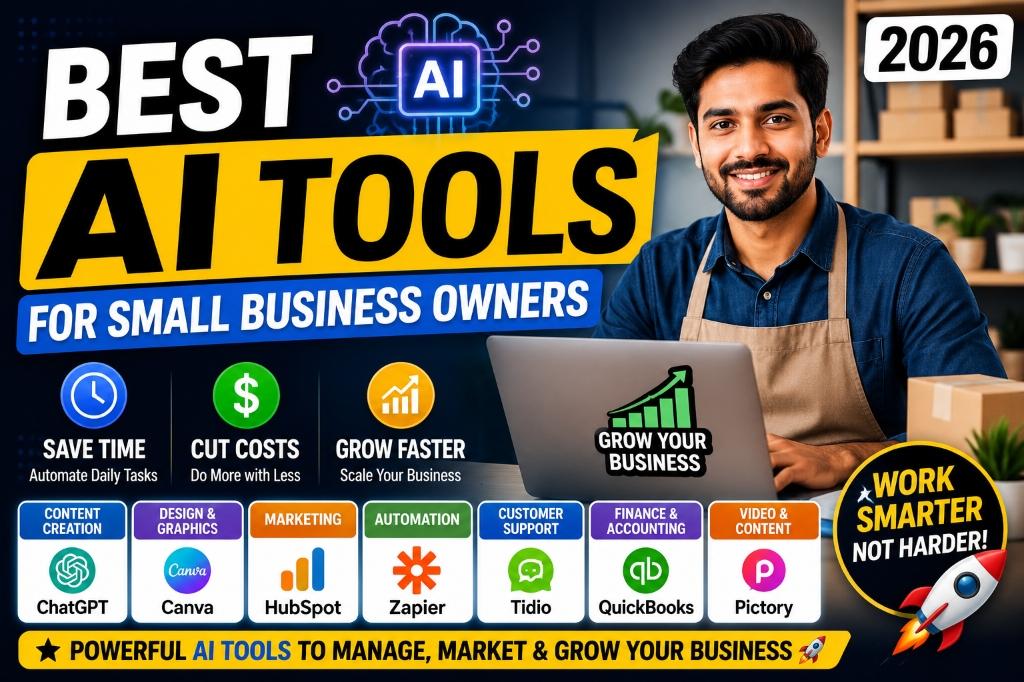
In this guide, you will find 12 of the best AI tools for small business owners — covering content creation, graphic design, marketing, automation, customer support, e-commerce, video, finance, and productivity. Each tool is reviewed with features, use cases, pros, and practical examples so you can decide which ones fit your business.
Important disclaimer: AI tools can improve efficiency, but business owners should always review AI-generated content, verify facts, protect customer data, and make final decisions themselves. AI should support your judgment, not replace it.
| What You Need Help With | How AI Can Assist |
|---|---|
| Too much content to create | AI drafts blog posts, captions, product descriptions, and emails |
| No design skills | AI creates social media posts, banners, flyers, and ad visuals |
| Repetitive admin tasks | AI automates data entry, follow-ups, and app connections |
| Slow customer responses | AI chatbots handle FAQs and common queries instantly |
| Product photography costs | AI generates product background concepts and mockups |
| Accounting headaches | AI helps organize invoices, expenses, and financial reports |
Quick Overview: Best AI Tools for Small Businesses in 2026
Here is a quick comparison of all 12 AI tools covered in this guide. Use this table to find the right tool for your specific business need.
| Tool Name | Best For | Main Use | Free Plan | Best For Which Business |
|---|---|---|---|---|
| ChatGPT | Content & Ideas | Writing, brainstorming, customer replies | Yes | All business types |
| Canva | Graphic Design | Social posts, banners, presentations | Yes | All business types |
| Zapier | Automation | Connecting apps, automating workflows | Yes (limited) | Agencies, e-commerce, services |
| HubSpot | CRM & Marketing | Lead management, email marketing | Yes | Service providers, agencies, B2B |
| Tidio | Customer Support | AI chatbots, live chat, FAQ replies | Yes | E-commerce, service businesses |
| QuickBooks | Finance | Invoicing, expense tracking, reports | Trial | All business types |
| Pictory | Video Creation | Text-to-video, blog-to-video | Trial | Content creators, marketers |
| Notion AI | Productivity | Planning, notes, SOPs, calendars | Yes (limited AI) | Freelancers, teams, agencies |
| Grammarly | Writing Quality | Grammar, tone, professional emails | Yes | All business types |
| Google Gemini | Research & Productivity | Research, drafting, Google Workspace | Yes | All business types |
| Adobe Firefly | AI Image Generation | Product visuals, backgrounds, designs | Yes (limited) | E-commerce, designers, brands |
| Shopify Magic | E-commerce AI | Product descriptions, store content | With Shopify plan | Shopify store owners |
How AI Can Help Small Business Owners
Before diving into individual tools, let us look at the specific ways AI can support your daily business operations. These are practical, real-world use cases — not futuristic ideas.
Content Creation: Draft blog posts, website pages, email newsletters, and marketing copy in minutes instead of hours. AI gives you a strong starting point that you can edit and personalize with your brand voice.
Product Descriptions: Write compelling, SEO-friendly product descriptions for your online store, marketplace listings, or catalog. This is especially useful for sellers managing hundreds of products on Amazon, Flipkart, Meesho, or Shopify. [Internal Link: AI Image Prompts for Product Photography]
Social Media Captions: Generate engaging captions, hashtag suggestions, and post ideas for Instagram, Facebook, LinkedIn, and Pinterest. AI can help you maintain a consistent posting schedule without spending hours writing every day.
Marketing Campaigns: Plan promotional campaigns, write ad copy, create email sequences, and brainstorm offers for festivals, sales events, and product launches.
Customer Support Replies: Set up AI chatbots to handle frequently asked questions, order status queries, and basic support requests. This means faster response times without hiring additional staff.
WhatsApp Message Drafts: Create professional WhatsApp Business messages for order confirmations, promotional offers, follow-ups, and customer greetings.
Product Photography Concepts: Generate AI product image backgrounds, lifestyle scenes, and mockup concepts for your e-commerce listings and social media ads.
Invoice and Finance Assistance: Automate invoice creation, categorize expenses, track payments, and generate basic financial reports to stay on top of your numbers.
Task Automation: Connect your business apps so that when something happens in one tool (like a new order), it automatically triggers an action in another tool (like adding the customer to a spreadsheet).
Business Planning: Create business plans, SOPs (standard operating procedures), meeting notes, content calendars, and project timelines with AI-assisted drafting.
Email Writing: Draft professional emails for clients, suppliers, partners, and customers — from cold outreach to follow-up sequences.
Video Creation: Turn your blog posts, scripts, or product descriptions into short marketing videos for Instagram Reels, YouTube Shorts, and Facebook ads.
ChatGPT – Best for Content Writing, Ideas & Business Communication
What it does:
ChatGPT by OpenAI is a versatile AI assistant that helps you write content, brainstorm ideas, draft emails, create product descriptions, generate marketing plans, and answer business questions through natural conversation. It is the most widely used AI tool for small businesses in 2026.
ChatGPT by OpenAI is a versatile AI assistant that helps you write content, brainstorm ideas, draft emails, create product descriptions, generate marketing plans, and answer business questions through natural conversation. It is the most widely used AI tool for small businesses in 2026.
Best features for small businesses:
- Write blog posts, social-media captions, product descriptions, and email drafts in seconds
- Brainstorm business ideas, marketing strategies, and content plans
- Draft professional customer replies and support responses
- Create prompts for AI image generators to design product visuals
- Summarize long documents, contracts, and research
- Generate multiple variations of any text for A/B testing
Best for: Virtually every small business — local shops, freelancers, e-commerce sellers, agencies, coaches, consultants, and solopreneurs. [Internal Link: ChatGPT Prompts for YouTube Creators]
Example use case: A Meesho seller uses ChatGPT to write unique product descriptions for 50 kurta listings in one afternoon, instead of spending a full week writing them manually.
Pros:
- Extremely versatile — handles writing, research, planning, and creative tasks
- Free plan available with generous usage
- Constantly improving with new features like image generation and file analysis
Things to consider:
- AI-generated content should always be reviewed and fact-checked before publishing
- Advanced features like GPT-4 and image generation may require a paid subscription
Pricing note: Free and paid plans available. Check chat.openai.com for current pricing and features.
Canva – Best for Graphic Design & Visual Content
What it does:
Canva is a user-friendly design platform with built-in AI features that help you create social-media posts, banners, product flyers, presentations, business cards, ad creatives, and marketing visuals without any design experience.
Canva is a user-friendly design platform with built-in AI features that help you create social-media posts, banners, product flyers, presentations, business cards, ad creatives, and marketing visuals without any design experience.
Best features for small businesses:
- Thousands of ready-made templates for Instagram, Facebook, YouTube, and print
- AI-powered Magic Design generates layouts from your text or images
- Background remover and AI image tools for product photography
- Brand Kit to maintain consistent colors, fonts, and logos across all designs
- Direct publishing to social-media platforms
- Collaboration features for small teams
Best for: Every small business that needs visual content — local stores, restaurants, e-commerce sellers, freelancers, coaches, social-media managers, and event planners.
Example use case: A local bakery creates a week's worth of Instagram posts with product photos, daily specials, and promotional banners using Canva templates — no graphic designer needed.
Pros:
- Extremely easy to use, even for complete beginners
- Generous free plan with thousands of templates
- AI features like Magic Design, text-to-image, and background remover
Things to consider:
- Some premium templates, stock photos, and AI features require a paid plan
- Complex design work may still need specialized design software
Pricing note: Free and paid plans available. Check canva.com for current pricing and features.
Zapier – Best for Automating Repetitive Workflows
What it does:
Zapier connects your business apps and automates workflows without coding. When something happens in one app, Zapier automatically triggers an action in another. It supports thousands of app integrations including Gmail, Google Sheets, Shopify, HubSpot, Slack, and more.
Zapier connects your business apps and automates workflows without coding. When something happens in one app, Zapier automatically triggers an action in another. It supports thousands of app integrations including Gmail, Google Sheets, Shopify, HubSpot, Slack, and more.
Best features for small businesses:
- Connect 6,000+ apps without writing any code
- Automate lead capture — new form submissions go straight to your CRM or spreadsheet
- Auto-send email confirmations when orders are placed
- Post to social media automatically when a new blog is published
- AI-powered suggestions for workflow improvements
Best for: Agencies, e-commerce sellers, service providers, and any business that uses multiple online tools and wants to eliminate manual data entry.
Example use case: A Shopify store owner sets up a Zap that automatically adds every new customer's email to a Google Sheet and sends them a welcome email through Gmail — zero manual work.
Pros:
- Saves hours of manual, repetitive work every week
- No coding required — visual workflow builder
- Works with virtually every business app
Things to consider:
- Free plan has limited tasks per month — active businesses may need a paid plan
- Complex multi-step automations require some learning time
Pricing note: Free and paid plans available. Check zapier.com for current pricing and features.
HubSpot – Best for CRM, Lead Management & Email Marketing
What it does:
HubSpot is an all-in-one CRM platform with AI-powered marketing, sales, and customer service tools. It helps you manage leads, send email campaigns, track customer interactions, and build sales pipelines — all from one dashboard.
HubSpot is an all-in-one CRM platform with AI-powered marketing, sales, and customer service tools. It helps you manage leads, send email campaigns, track customer interactions, and build sales pipelines — all from one dashboard.
Best features for small businesses:
- Free CRM to track contacts, deals, and customer conversations
- AI-powered email writing assistant for marketing campaigns
- Automated follow-up sequences and lead nurturing
- Contact management with complete interaction history
- Built-in meeting scheduler and live chat
- Marketing analytics and reporting dashboards
Best for: Service providers, agencies, consultants, B2B businesses, coaches, and any business that needs to manage client relationships and sales pipelines.
Example use case: A digital marketing consultant tracks all client inquiries in HubSpot's free CRM, sets up automated follow-up emails, and uses the AI email assistant to draft personalized proposals — closing more deals without hiring a sales team.
Pros:
- Powerful free CRM with generous features
- All-in-one platform reduces the need for multiple tools
- AI features help draft emails and analyze marketing performance
Things to consider:
- Advanced features (marketing automation, custom reports) are in higher-tier paid plans
- Can feel overwhelming for very small businesses — start with the free CRM and expand gradually
Pricing note: Free and paid plans available. Check hubspot.com for current pricing and features.
Tidio – Best for AI Chatbots & Customer Support
What it does:
Tidio provides AI-powered chatbots and live chat for your website. It handles common customer questions automatically, captures leads, and provides instant responses — even when you are away. It integrates with Shopify, WordPress, and other platforms.
Tidio provides AI-powered chatbots and live chat for your website. It handles common customer questions automatically, captures leads, and provides instant responses — even when you are away. It integrates with Shopify, WordPress, and other platforms.
Best features for small businesses:
- AI chatbot (Lyro) answers FAQs using your business content
- Live chat widget for real-time customer conversations
- Pre-built chatbot templates for common business scenarios
- Integrations with Shopify, WooCommerce, and email platforms
- Visitor tracking to see who is browsing your website
Best for: E-commerce stores, service businesses, SaaS companies, and any business with a website that receives customer queries.
Example use case: An online clothing store installs Tidio on their Shopify site. The AI chatbot automatically answers questions about shipping times, return policies, and size charts — reducing support emails by a significant amount.
Pros:
- AI chatbot handles common queries without human intervention
- Easy to set up — no coding required
- Free plan available for small websites
Things to consider:
- AI chatbot accuracy depends on the quality of your training content
- Advanced AI features and higher conversation limits require paid plans
Pricing note: Free and paid plans available. Check tidio.com for current pricing and features.
QuickBooks – Best for Invoicing, Expenses & Financial Organization
What it does:
QuickBooks is accounting software with AI-powered features that help small businesses track expenses, create invoices, manage cash flow, categorize transactions, and generate financial reports. It simplifies the financial side of running a business.
QuickBooks is accounting software with AI-powered features that help small businesses track expenses, create invoices, manage cash flow, categorize transactions, and generate financial reports. It simplifies the financial side of running a business.
Best features for small businesses:
- AI-assisted expense categorization from bank feeds
- Professional invoice creation and automated payment reminders
- Cash flow tracking and basic financial reporting
- Receipt scanning and capture using mobile app
- Tax preparation assistance and report generation
- Integration with banks, payment processors, and other business tools
Best for: All small businesses — freelancers, service providers, local shops, e-commerce sellers, consultants, and anyone who needs organized financial records.
Example use case: A freelance graphic designer connects QuickBooks to their bank account, and the AI automatically categorizes business expenses, generates monthly invoices for clients, and provides a clear profit-and-loss report at tax time.
Pros:
- Trusted, widely-used accounting platform with AI enhancements
- Saves significant time on bookkeeping and invoicing
- Mobile app for on-the-go expense tracking
Things to consider:
- No permanent free plan — typically offers a trial period, then requires a subscription
- Learning curve for business owners with no accounting background
Pricing note: Free trial may be available. Check quickbooks.intuit.com for current pricing and features.
Pictory – Best for Turning Text into Marketing Videos
What it does:
Pictory is an AI video creation tool that transforms blog posts, scripts, and text content into short, engaging marketing videos. It is designed for business owners who need video content but do not have video editing skills or expensive software.
Pictory is an AI video creation tool that transforms blog posts, scripts, and text content into short, engaging marketing videos. It is designed for business owners who need video content but do not have video editing skills or expensive software.
Best features for small businesses:
- Convert blog posts and articles into videos automatically
- AI selects relevant stock footage, images, and music
- Auto-generated captions and subtitles
- Text-to-video with AI voiceover options
- Multiple video formats for Instagram Reels, YouTube Shorts, and Facebook
Best for: Content creators, digital marketers, coaches, e-commerce sellers, and any business that wants to create video content without hiring a video editor. [Internal Link: AI Tools for Content Creators]
Example use case: A health supplement brand takes their blog post about "5 Benefits of Ashwagandha" and uses Pictory to create a 60-second Instagram Reel with stock footage, text overlays, and background music — in under 10 minutes.
Pros:
- No video editing skills required
- Turns existing content into video — saves content creation time
- Multiple format options for different social platforms
Things to consider:
- Stock footage may not always match your specific product or brand style
- Free trial has limitations — most features require a paid plan
Pricing note: Free trial may be available. Check pictory.ai for current pricing and features.
Notion AI – Best for Business Planning, Notes & Team Documentation
What it does:
Notion is a powerful all-in-one workspace for notes, documents, databases, and project management. Its built-in AI assistant helps you draft content, summarize notes, create action items, build content calendars, and organize your business operations.
Notion is a powerful all-in-one workspace for notes, documents, databases, and project management. Its built-in AI assistant helps you draft content, summarize notes, create action items, build content calendars, and organize your business operations.
Best features for small businesses:
- AI-powered writing and editing within your workspace
- Create SOPs, business plans, and process documentation
- Build content calendars, task boards, and project trackers
- Meeting note summaries and action item extraction
- Customizable databases for inventory, clients, or content
- Team collaboration with shared workspaces
Best for: Freelancers, small teams, agencies, consultants, coaches, and any business that needs organized documentation and project management.
Example use case: A social-media agency uses Notion AI to create a monthly content calendar for five clients, write SOPs for their content creation process, and generate meeting summaries after each client call — all in one workspace.
Pros:
- Combines notes, tasks, databases, and AI in one tool
- Highly customizable — adapts to any business workflow
- Free plan available for personal use
Things to consider:
- AI features are an add-on and may require an additional subscription
- Initial setup takes time — there is a learning curve for building custom systems
Pricing note: Free and paid plans available. Check notion.so for current pricing and features.
Grammarly – Best for Professional Writing & Communication
What it does:
Grammarly is an AI writing assistant that checks grammar, spelling, tone, and clarity across everything you write — emails, product descriptions, proposals, customer messages, and social-media posts. It helps you communicate professionally without a dedicated editor.
Grammarly is an AI writing assistant that checks grammar, spelling, tone, and clarity across everything you write — emails, product descriptions, proposals, customer messages, and social-media posts. It helps you communicate professionally without a dedicated editor.
Best features for small businesses:
- Real-time grammar, spelling, and punctuation correction
- Tone detection and suggestions (professional, friendly, confident)
- AI-powered rewriting for clarity and conciseness
- Works inside Gmail, Google Docs, social-media platforms, and most text fields
- Brand tone settings for consistent communication
Best for: Every small business owner who writes emails, proposals, product descriptions, customer messages, or marketing content — regardless of industry.
Example use case: A consultant drafts a client proposal in Google Docs. Grammarly catches three grammatical errors, suggests a more confident tone for the pricing section, and simplifies two overly complex sentences — making the entire proposal more professional.
Pros:
- Works everywhere you write — browser extension, desktop app, mobile
- Free plan covers essential grammar and spelling checks
- Tone suggestions help maintain professional communication
Things to consider:
- Advanced features (tone rewriting, full-sentence rewrites, plagiarism detection) require a premium plan
- May occasionally suggest changes that alter your intended meaning — always review
Pricing note: Free and paid plans available. Check grammarly.com for current pricing and features.
Google Gemini – Best for Research, Idea Generation & Workspace Productivity
What it does:
Google Gemini is Google's AI assistant that helps with research, idea generation, document drafting, email writing, and productivity across Google Workspace (Gmail, Docs, Sheets, Slides). It is a strong alternative to ChatGPT, especially for businesses already using Google's ecosystem.
Google Gemini is Google's AI assistant that helps with research, idea generation, document drafting, email writing, and productivity across Google Workspace (Gmail, Docs, Sheets, Slides). It is a strong alternative to ChatGPT, especially for businesses already using Google's ecosystem.
Best features for small businesses:
- Research assistance with summarized, sourced answers
- Draft emails, documents, and presentations within Google Workspace
- Generate business ideas, marketing strategies, and content plans
- Analyze data in Google Sheets with AI suggestions
- Create presentations from text prompts in Google Slides
- Free to use with a Google account
Best for: All small business owners, especially those already using Gmail, Google Docs, and Google Sheets for daily operations.
Example use case: A startup founder uses Gemini to research competitor pricing, draft a business pitch in Google Docs, and create a financial projection spreadsheet in Google Sheets — all within the Google ecosystem they already use.
Pros:
- Deeply integrated with Google Workspace — works where you already work
- Free tier available with a standard Google account
- Strong at research, summarization, and data analysis
Things to consider:
- Advanced Gemini features may require a Google One AI Premium subscription
- Image generation and creative capabilities are still evolving compared to specialized tools
Pricing note: Free and paid plans available. Check gemini.google.com for current pricing and features.
Adobe Firefly – Best for AI Image Generation & Product Visuals
What it does:
Adobe Firefly is Adobe's AI image generation tool that creates product visuals, background concepts, marketing graphics, and creative designs from text prompts. It is designed to be commercially safe, making it suitable for business use.
Adobe Firefly is Adobe's AI image generation tool that creates product visuals, background concepts, marketing graphics, and creative designs from text prompts. It is designed to be commercially safe, making it suitable for business use.
Best features for small businesses:
- Generate product background concepts and lifestyle scenes from text prompts
- Text-to-image for marketing visuals, social-media posts, and ad creatives
- Generative Fill to edit and enhance existing product photos
- Commercially safe — trained on licensed content
- Integration with Adobe Creative Cloud (Photoshop, Illustrator)
Best for: E-commerce sellers, product-based businesses, brands needing marketing visuals, and designers. [Internal Link: AI Image Prompts for Product Photography]
Example use case: An Etsy jewelry seller uses Adobe Firefly to generate elegant background concepts for their product photos — silk fabric, rose petals, and soft lighting — without setting up a physical photo studio.
Pros:
- Commercially safe AI-generated images for business use
- Powerful editing features with Generative Fill
- Free credits available for new users
Things to consider:
- Free plan has limited monthly credits — heavy users need a paid subscription
- Generated images should still be reviewed for accuracy before using in product listings
Pricing note: Free credits and paid plans available. Check firefly.adobe.com for current pricing and features.
Shopify Magic – Best for E-commerce Store Content & Product Descriptions
What it does:
Shopify Magic is Shopify's built-in AI assistant that helps store owners write product descriptions, generate store content, draft customer communications, and optimize their e-commerce workflow — all within the Shopify dashboard.
Shopify Magic is Shopify's built-in AI assistant that helps store owners write product descriptions, generate store content, draft customer communications, and optimize their e-commerce workflow — all within the Shopify dashboard.
Best features for small businesses:
- AI-generated product descriptions from basic product details
- Auto-suggest SEO-friendly titles and meta descriptions
- Draft customer email replies and communication templates
- AI-powered product image background editing
- Built directly into the Shopify admin — no external tools needed
Best for: Shopify store owners, dropshipping businesses, and e-commerce brands using the Shopify platform. [Internal Link: AI Prompts for E-commerce]
Example use case: A Shopify store owner selling handmade candles enters the basic product details (scent, material, size) and Shopify Magic generates three unique product description variations, a meta description, and suggested tags — saving an hour per product listing.
Pros:
- Built into Shopify — no extra apps or subscriptions needed
- Designed specifically for e-commerce use cases
- Helps maintain consistent product listing quality across your store
Things to consider:
- Only available to Shopify users — not useful if you sell on other platforms
- AI-generated descriptions should be reviewed and customized to match your brand voice
Pricing note: Included with Shopify plans. Check shopify.com for current plan pricing and features.
Best AI Tools by Business Task
Not sure which tool to use for a specific task? This table maps common business tasks to the best AI tools for that job.
| Task | Recommended AI Tools | Example Use |
|---|---|---|
| Content Writing | ChatGPT, Grammarly, Notion AI | Blog drafts, captions, emails |
| Graphic Design | Canva, Adobe Firefly | Social posts, banners, product visuals |
| Automation | Zapier | Auto-send leads to spreadsheets |
| Customer Support | Tidio, HubSpot | FAQ replies and chat support |
| E-commerce | Shopify Magic, ChatGPT, Canva | Product listings and store creatives |
| Video Marketing | Pictory, Canva | Reels, ads, explainer videos |
| Finance & Planning | QuickBooks, Notion AI | Invoices, expense organization, plans |
| Research & Productivity | Google Gemini, ChatGPT | Market research and business ideas |
AI Tool Stack for Different Small Businesses
Different businesses have different needs. Here are tailored AI tool recommendations for specific business types.
1. Local Retail Shop
- Canva – Create promotional posters, festive banners, and daily offers
- ChatGPT – Write WhatsApp promotional messages and customer greetings
- Google Gemini – Research local market trends and competitor pricing
- QuickBooks – Track daily sales, expenses, and create invoices
2. Meesho or Amazon Seller
- ChatGPT – Write SEO-optimized product descriptions and bullet points
- Canva – Design product listing images and A+ content visuals
- Adobe Firefly – Generate product background concepts for lifestyle images
- Grammarly – Ensure product descriptions are error-free and professional
3. Shopify Store Owner
- Shopify Magic – Generate product descriptions and store content
- Canva – Design homepage banners, collection graphics, and ad creatives
- Tidio – Set up AI chatbot for customer support on your store
- Zapier – Automate order notifications and inventory updates
- Pictory – Create product videos for social-media marketing
4. Freelancer or Agency Owner
- Notion AI – Manage projects, SOPs, client databases, and content calendars
- ChatGPT – Draft proposals, emails, reports, and creative briefs
- Grammarly – Polish all client-facing communication
- HubSpot – Track leads, manage client relationships, and automate follow-ups
- QuickBooks – Generate invoices and track project-based income
5. Coach or Consultant
- ChatGPT – Create course outlines, coaching frameworks, and email sequences
- Canva – Design lead magnets, presentations, and social-media carousels
- HubSpot – Manage leads and automate booking follow-ups
- Google Gemini – Research industry trends and prepare client materials
6. Restaurant or Café Owner
- Canva – Design daily specials, menu boards, and Instagram food posts
- ChatGPT – Write menu descriptions, Google Business responses, and marketing messages
- Tidio – Handle online reservation queries and FAQ questions on your website
- QuickBooks – Track daily expenses, vendor payments, and revenue
7. Home-Based Business
- ChatGPT – Write product descriptions, customer messages, and social-media captions
- Canva – Create Instagram posts, packaging labels, and business cards
- Adobe Firefly – Generate product photography backgrounds
- Grammarly – Ensure all written content is professional
8. Social Media Service Provider
- ChatGPT – Draft captions, hashtag strategies, and content calendars for clients
- Canva – Design posts, Reels covers, Stories, and carousel graphics
- Notion AI – Organize client content plans, approvals, and schedules
- Pictory – Convert client blog posts into short video content
- Grammarly – Proofread all client captions before publishing
How to Choose the Right AI Tool for Your Business
With so many AI tools available, it is easy to feel overwhelmed. Here is a practical approach to choosing the right tools for your business:
- Start with one business problem. Do not try to adopt five tools at once. Identify your biggest time-waster or pain point (e.g., writing product descriptions) and find one tool that solves it.
- Choose tools that fit your current workflow. If you already use Google Workspace, Google Gemini integrates naturally. If you are on Shopify, Shopify Magic is built in. Choose tools that complement what you already use.
- Test free plans before upgrading. Almost every tool on this list offers a free plan or trial. Use it for at least two weeks before committing to a paid subscription.
- Check integrations with your existing apps. Make sure the AI tool connects with your other business tools (email, CRM, e-commerce platform, accounting software).
- Protect customer and business data. Read privacy policies before entering sensitive business or customer information into any AI tool.
- Review AI output before publishing. AI-generated content, images, and data should always be reviewed by a human before going live. Check for accuracy, brand voice, and factual correctness.
- Train your team gradually. If you have employees, introduce AI tools one at a time with simple use cases. Let the team build confidence before adding complexity.
- Track whether the tool actually saves time. After using a tool for a month, evaluate whether it genuinely reduced your workload or just added another thing to manage.
7 Practical Ways to Use AI in a Small Business Today
Not sure where to start? Here are seven actionable things you can do with AI tools right now — no advanced skills required.
1. Create 30 Instagram captions.
Open ChatGPT and type: "Create 30 Instagram captions for a [your business type] brand. Include relevant hashtags and a call to action." You will have a month's worth of captions in minutes.
Open ChatGPT and type: "Create 30 Instagram captions for a [your business type] brand. Include relevant hashtags and a call to action." You will have a month's worth of captions in minutes.
2. Write product descriptions.
Paste your product details into ChatGPT and ask it to write a compelling, SEO-friendly product description. Edit the output to match your brand voice, then upload to your store.
Paste your product details into ChatGPT and ask it to write a compelling, SEO-friendly product description. Edit the output to match your brand voice, then upload to your store.
3. Draft WhatsApp promotional messages.
Ask ChatGPT to write WhatsApp broadcast messages for a festival sale, new product launch, or customer follow-up. Customize with your brand name and offer details.
Ask ChatGPT to write WhatsApp broadcast messages for a festival sale, new product launch, or customer follow-up. Customize with your brand name and offer details.
4. Create a weekly content calendar.
Use Notion AI or ChatGPT to generate a 7-day content plan with post topics, captions, and content types (Reel, carousel, Story, static post) for your social-media channels.
Use Notion AI or ChatGPT to generate a 7-day content plan with post topics, captions, and content types (Reel, carousel, Story, static post) for your social-media channels.
5. Generate product-photo background concepts.
Use Adobe Firefly or ChatGPT (with image generation) to create background concepts for your product photos — marble surfaces, lifestyle settings, seasonal themes. [Internal Link: AI Image Prompts for Product Photography]
Use Adobe Firefly or ChatGPT (with image generation) to create background concepts for your product photos — marble surfaces, lifestyle settings, seasonal themes. [Internal Link: AI Image Prompts for Product Photography]
6. Reply to common customer questions.
Set up Tidio on your website with answers to your top 10 FAQs (shipping, returns, payment options, sizing). The AI chatbot handles these questions automatically.
Set up Tidio on your website with answers to your top 10 FAQs (shipping, returns, payment options, sizing). The AI chatbot handles these questions automatically.
7. Turn a blog post into a short video.
Paste a blog post or article into Pictory. It will automatically create a 60-second video with stock footage, captions, and background music — ready for Instagram Reels or YouTube Shorts.
Paste a blog post or article into Pictory. It will automatically create a 60-second video with stock footage, captions, and background music — ready for Instagram Reels or YouTube Shorts.
Common Mistakes to Avoid When Using AI for Business
AI tools are powerful, but they can cause problems if used carelessly. Avoid these common mistakes:
- Copying AI output without reviewing it. AI can generate incorrect facts, awkward phrasing, or content that does not match your brand. Always read, edit, and verify before publishing.
- Sharing private customer information with AI tools. Never paste customer names, phone numbers, payment details, or personal data into AI chatbots or generators. Protect customer privacy.
- Using fake testimonials or misleading product claims. AI can easily generate fake reviews or exaggerated product benefits. This damages trust and may violate platform policies or advertising laws.
- Publishing incorrect pricing or policy information. AI does not know your current prices or return policies. Always verify business-specific details before publishing.
- Using too many tools at once. Adopting five new AI tools simultaneously creates confusion and wastes time. Start with one or two, master them, then expand.
- Ignoring brand voice. AI writes in a generic tone by default. Customize the output to sound like your brand — whether that is professional, friendly, playful, or authoritative.
- Depending on AI for final legal, financial, or medical advice. AI tools are not substitutes for professional advisors. Use AI for drafting and organizing, but consult qualified professionals for critical decisions.
- Not checking platform rules for AI-generated content. Some marketplaces and social platforms have specific rules about AI-generated images, text, or reviews. Check the latest policies before publishing.
Frequently Asked Questions
1. What is the best AI tool for small business owners?
There is no single best tool — it depends on your need. ChatGPT is the most versatile for content and communication. Canva is the easiest for design. Zapier is the strongest for automation. Start with the tool that solves your biggest daily challenge.
There is no single best tool — it depends on your need. ChatGPT is the most versatile for content and communication. Canva is the easiest for design. Zapier is the strongest for automation. Start with the tool that solves your biggest daily challenge.
2. Can small businesses use AI for free?
Yes. ChatGPT, Canva, Grammarly, Google Gemini, HubSpot CRM, Tidio, and Notion all offer free plans that are useful for small businesses. You can accomplish a lot before needing to upgrade to paid plans.
Yes. ChatGPT, Canva, Grammarly, Google Gemini, HubSpot CRM, Tidio, and Notion all offer free plans that are useful for small businesses. You can accomplish a lot before needing to upgrade to paid plans.
3. How can AI help a small business save time?
AI helps by automating repetitive tasks — drafting content, answering customer FAQs, organizing data, creating social-media visuals, and generating product descriptions. Tasks that used to take hours can often be completed in minutes with AI assistance.
AI helps by automating repetitive tasks — drafting content, answering customer FAQs, organizing data, creating social-media visuals, and generating product descriptions. Tasks that used to take hours can often be completed in minutes with AI assistance.
4. Which AI tool is best for marketing?
For content marketing, use ChatGPT and Grammarly. For visual marketing, use Canva and Adobe Firefly. For email marketing and CRM, use HubSpot. For video marketing, use Pictory. A combination of two or three tools usually covers most marketing needs.
For content marketing, use ChatGPT and Grammarly. For visual marketing, use Canva and Adobe Firefly. For email marketing and CRM, use HubSpot. For video marketing, use Pictory. A combination of two or three tools usually covers most marketing needs.
5. Can AI create product descriptions?
Yes. ChatGPT, Shopify Magic, and Google Gemini can all generate product descriptions. Provide specific details about your product (material, size, features, use cases) for the best results. Always edit the output for accuracy and brand voice.
Yes. ChatGPT, Shopify Magic, and Google Gemini can all generate product descriptions. Provide specific details about your product (material, size, features, use cases) for the best results. Always edit the output for accuracy and brand voice.
6. Can AI help with customer support?
Yes. Tidio and HubSpot both offer AI-powered chatbots that can handle common customer questions, order status queries, and FAQ responses automatically. This provides instant support even outside business hours.
Yes. Tidio and HubSpot both offer AI-powered chatbots that can handle common customer questions, order status queries, and FAQ responses automatically. This provides instant support even outside business hours.
7. Is AI useful for Meesho, Amazon, and Shopify sellers?
Absolutely. ChatGPT helps with product descriptions and marketing content. Canva and Adobe Firefly help with product images and listing graphics. Shopify Magic is built specifically for Shopify sellers. These tools can significantly improve listing quality and save time.
Absolutely. ChatGPT helps with product descriptions and marketing content. Canva and Adobe Firefly help with product images and listing graphics. Shopify Magic is built specifically for Shopify sellers. These tools can significantly improve listing quality and save time.
8. Can AI create social media posts for a business?
Yes. ChatGPT writes captions and content ideas. Canva designs the visual posts. Pictory creates video content. Together, these tools can help you maintain a consistent social-media presence without a dedicated social-media team.
Yes. ChatGPT writes captions and content ideas. Canva designs the visual posts. Pictory creates video content. Together, these tools can help you maintain a consistent social-media presence without a dedicated social-media team.
9. Are AI tools safe for business data?
Most major AI tools have security measures in place, but you should always read the privacy policy of any tool before entering sensitive information. Avoid sharing customer personal data, payment details, or confidential business information with AI tools.
Most major AI tools have security measures in place, but you should always read the privacy policy of any tool before entering sensitive information. Avoid sharing customer personal data, payment details, or confidential business information with AI tools.
10. Which AI tool should a beginner start with?
Start with ChatGPT for writing and ideas, and Canva for design. Both have free plans, are beginner-friendly, and cover the two most common needs of small business owners — content creation and visual design.
Start with ChatGPT for writing and ideas, and Canva for design. Both have free plans, are beginner-friendly, and cover the two most common needs of small business owners — content creation and visual design.
Conclusion
In 2026, AI tools for small business owners are not futuristic luxuries — they are practical, accessible assistants that can help you reduce repetitive work, create better content, organize your operations, and improve customer communication.
The 12 tools covered in this guide — ChatGPT, Canva, Zapier, HubSpot, Tidio, QuickBooks, Pictory, Notion AI, Grammarly, Google Gemini, Adobe Firefly, and Shopify Magic — cover virtually every major business function from content and design to automation, customer support, and finance.
You do not need to use all 12 tools at once. Start with one tool that solves your most pressing problem. Test it on one real task this week. Once you see the time savings, gradually build a simple AI workflow that fits your business.
Remember: AI is a tool, not a replacement for your business judgment, customer relationships, or product quality. Use it wisely, review everything before publishing, protect customer data, and let AI handle the repetitive work while you focus on growing your business.
Bookmark this page and come back whenever you need to explore a new tool or find the right AI solution for a new business challenge.
Explore more free AI prompts, business tools, e-commerce ideas and marketing resources on newbananaprompts.in.
Related Articles
Continue growing your business with more AI resources:
- Generate stunning product photos with 30 AI Image Prompts for Product Photography in 2026.
- Build your content workflow with Best AI Tools for Content Creators in 2026.
- Create YouTube content with 50 Best ChatGPT Prompts for YouTube Creators in 2026.
- Improve your search visibility with Best AI SEO Tools in 2026.
- Learn AI marketing strategies with Best AI Marketing Tools for Small Businesses in 2026.
- Generate realistic AI images with 25 Best Nano Banana Prompts for Realistic AI Images.
- Start an AI design business with How to Start an AI Thumbnail Design Business in 2026.