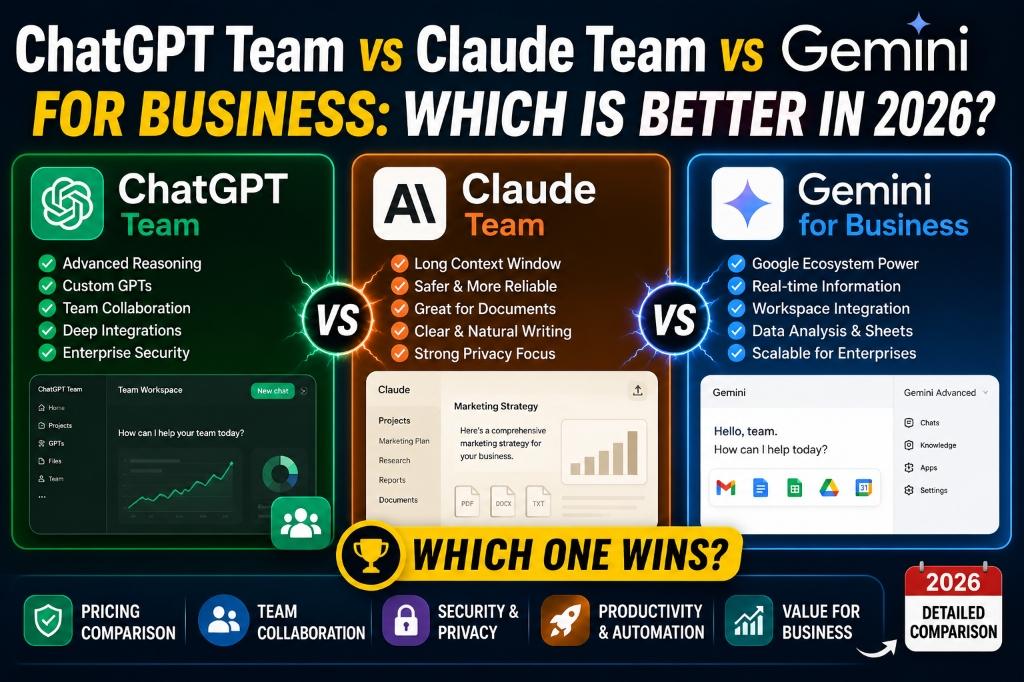
ChatGPT Team vs Claude Team vs Gemini for Business: Which Is Better in 2026?
AI assistants are no longer experimental side projects — they are becoming core tools in daily business operations. Teams across the world now use AI for content creation, email drafting, report writing, customer support, research, data analysis, meeting summaries, project planning, and workflow automation.
In 2026, three major AI platforms compete for business teams: ChatGPT Team by OpenAI, Claude Team by Anthropic, and Gemini for Business by Google. Each platform has different strengths, pricing models, integrations, and privacy approaches.
The right choice depends on whether your business needs creative content, long-document analysis, Google Workspace integration, team collaboration features, privacy controls, or automation capabilities. There is no single "best" tool — only the best fit for your specific workflow.
In this guide, we compare all three platforms across features, business tasks, pricing, team collaboration, privacy, and practical use cases to help you make an informed decision. [Internal Link: Best AI Tools for Small Business Owners]
Disclaimer: This comparison is for general educational purposes. Features, pricing, availability, integrations and policies can change at any time. Always review official documentation and current plan details before making a business purchase decision.
Quick Verdict
Before we dive into the detailed comparison, here is a quick summary of which tool may fit different business needs. This is not a final universal ranking — it is a starting point based on each platform's general strengths.
| Business Need | Recommended Option | Why It May Fit |
|---|---|---|
| Creative content, marketing & brainstorming | ChatGPT Team | Strong at generating diverse content formats, marketing copy, and creative ideas with flexible customization options |
| Long documents, structured writing & analysis | Claude Team | Known for handling long-context documents, detailed summaries, and structured business writing |
| Google Workspace & Google ecosystem workflows | Gemini for Business | Deeply integrated with Gmail, Docs, Sheets, Drive, and Meet for seamless Google-based workflows |
| Small team testing AI workflows | Compare all three | Each tool offers different trial or entry options — test with your actual business tasks before committing |
| Enterprise compliance & data controls | Review each plan carefully | All three offer enterprise-grade options, but data policies, admin controls, and compliance features vary |
Important: These are general tendencies, not guarantees. Features and capabilities evolve frequently. Test each tool with your real business tasks before making a final decision.
ChatGPT Team vs Claude Team vs Gemini: At a Glance
This comparison table gives you a high-level view of how the three platforms differ across key features that matter for business teams.
| Feature | ChatGPT Team | Claude Team | Gemini for Business |
|---|---|---|---|
| Best For | Creative content, marketing, brainstorming, flexible AI workflows | Long documents, structured writing, analysis, research summaries | Google Workspace productivity, email, docs, sheets, research |
| Writing & Content Creation | Strong — versatile across many content types and tones | Strong — particularly detailed and structured output | Good — integrated into Docs and Gmail for contextual writing |
| Long Document Analysis | Supported — check current context limits | Strong — known for large context window capabilities | Supported — check current plan limits |
| Research Support | Web browsing and analysis available | Strong analytical capabilities for uploaded content | Google Search integration for real-time information |
| Google Workspace Integration | Limited — third-party integrations may be available | Limited — primarily through its own interface | Deep native integration with Gmail, Docs, Sheets, Drive, Meet |
| Team Collaboration | Shared workspace, team management features | Team workspace with shared conversations | Workspace-level deployment across Google tools |
| File Handling | Supports various file types including images, PDFs, spreadsheets | Strong PDF and document processing capabilities | Google Drive integration for file access |
| Coding Assistance | Strong code generation, debugging, and explanation | Strong code generation and analysis | Code assistance available — check plan details |
| Image Generation / Visual Support | DALL-E image generation included | No native image generation — analysis of uploaded images | Imagen integration — check plan availability |
| Data Analysis | Advanced Data Analysis for spreadsheets and datasets | Strong analytical capabilities for uploaded data | Google Sheets integration for data tasks |
| Custom AI Assistants / Workflows | Custom GPTs for team-specific workflows | Projects feature for organized workflows | Gems and Google Workspace extensions |
| Admin Controls | Team admin dashboard and usage management | Admin controls for team management | Google Admin Console integration |
| Privacy & Data Controls | Business data not used for training — check official policy | Privacy-focused design — check official policy | Enterprise data protection — check official policy |
| Pricing Approach | Per-user monthly billing | Per-user monthly billing | Add-on to Google Workspace or standalone |
| Free Trial / Free Plan | Free ChatGPT available — Team plan is paid | Free Claude available — Team plan is paid | Check official website for current trial options |
| Best Business Type | Marketing teams, agencies, e-commerce, startups | Consultants, analysts, researchers, operations | Google Workspace users, remote teams, service businesses |
Note: Features and capabilities are subject to change. Check each platform's official documentation for the most current information.
1. ChatGPT Team for Business
ChatGPT Team is OpenAI's collaborative AI workspace designed for business teams. It provides access to advanced AI models, shared workspaces, custom GPTs, and team management features — all with business-grade data privacy settings.
What ChatGPT Team Is Best For
ChatGPT Team excels in creative and diverse content tasks. Here are practical use cases where it tends to perform well:
- Marketing content: Blog post drafts, ad copy, campaign ideas, and promotional messages
- Blog outlines: Full article structures with headings, talking points, and SEO suggestions
- Product descriptions: Compelling, varied descriptions for e-commerce listings
- Email drafts: Professional emails for clients, suppliers, partners, and customers
- Social media captions: Platform-specific captions with hashtag suggestions
- Business ideas: Brainstorming sessions for new products, services, and strategies
- Customer support templates: Reply templates for common customer scenarios
- Spreadsheet analysis: Upload CSV or Excel files for data insights
- Internal documentation: SOPs, process guides, and team knowledge bases
- Custom GPT workflows: Build team-specific AI assistants for repetitive tasks
ChatGPT Team: Key Strengths
- Highly versatile — handles a wide range of content types, tones, and formats
- Built-in image generation (DALL-E) for visual content needs
- Advanced Data Analysis for working with spreadsheets and datasets
- Custom GPTs allow teams to create specialized AI assistants
- Large ecosystem of plugins and integrations
- Frequently updated with new features and model improvements
- Business data is not used for model training (check official data usage policy for current details)
- Web browsing capability for research-related tasks
ChatGPT Team: Possible Limitations
- AI-generated content always needs human review for accuracy and brand voice
- Features and model access can vary by plan tier and region
- Businesses should carefully review data privacy settings and configure them appropriately
- Teams may need initial training to use custom GPTs and advanced features effectively
- Google Workspace integration is not as deep as Gemini's native integration
ChatGPT Team: Best For
Marketing teams, digital agencies, content creators, small businesses, e-commerce sellers, consultants, startups, and teams that need flexible, multi-purpose AI assistance across content, research, analysis, and creative workflows. [Internal Link: AI Tools for Content Creators]
ChatGPT Team: Example Business Use Case
A small e-commerce team uses ChatGPT Team to draft product descriptions for 200 new listings, create weekly Instagram captions, prepare customer reply templates for their support team, and generate marketing ideas for an upcoming seasonal sale. The team creates a custom GPT trained on their brand guidelines to ensure consistent tone across all outputs.
2. Claude Team for Business
Claude Team by Anthropic is designed for business teams that work heavily with long documents, structured analysis, and detailed writing. Claude is known for its ability to process large amounts of text and produce organized, thoughtful responses.
What Claude Team Is Best For
Claude Team shines when your business involves reading, analyzing, and writing long-form content. Key use cases include:
- Long reports: Summarizing and analyzing lengthy business reports, market research, and industry documents
- Policy documents: Reviewing and drafting internal policies, handbooks, and compliance guidelines
- Business proposals: Creating structured, detailed proposals for clients and partners
- Research summaries: Distilling large volumes of research into actionable summaries
- Detailed writing: Producing well-organized, comprehensive written content
- Large document review: Processing and extracting insights from lengthy PDFs and documents
- Internal knowledge analysis: Working with uploaded company documents to answer questions
- Structured business communication: Formal letters, memos, and executive summaries
Claude Team: Key Strengths
- Known for large context window — can process lengthy documents in a single conversation
- Produces well-structured, organized output with clear formatting
- Strong at following detailed instructions and maintaining consistency
- Privacy-focused design with emphasis on safe, helpful AI responses
- Projects feature helps organize work by topic or client
- Thoughtful, nuanced responses — particularly good for analysis and summaries
- Business data handling with privacy protections (check official policy for current details)
- Clean, focused interface designed for professional work
Claude Team: Possible Limitations
- Businesses should verify current integrations and available features, as the platform continues evolving
- No native image generation — focuses on text-based tasks
- May not suit every creative or visual-heavy workflow as well as competitors
- AI responses still require human review, especially for business-critical documents
- Plan availability and specific features may vary by region and change over time
Claude Team: Best For
Consultants, researchers, legal-adjacent business teams, agencies handling client reports, business analysts, operations teams, and any business that regularly works with long written documents, proposals, research papers, or internal knowledge bases.
Claude Team: Example Business Use Case
A consulting team uploads a 120-page client report to Claude, asks it to summarize key findings by department, identify the top five risks, and create a structured 2-page executive summary for the client presentation. Claude processes the entire document and delivers organized, clearly formatted output that the team reviews and refines before the meeting.
3. Gemini for Business
Gemini for Business is Google's AI solution designed to work natively within Google Workspace. It brings AI assistance directly into Gmail, Google Docs, Google Sheets, Google Slides, Google Drive, and Google Meet — the tools many businesses already use daily.
What Gemini for Business Is Best For
Gemini for Business is most powerful when your team already lives in the Google ecosystem. Practical use cases include:
- Google Docs support: Draft, edit, and rewrite content directly within Docs
- Gmail drafting: Compose, summarize, and reply to emails with AI assistance
- Google Sheets assistance: Generate formulas, organize data, and create summaries
- Google Drive content search: Find and summarize information across your Drive files
- Meeting notes: Summarize Google Meet recordings and extract action items
- Workspace productivity: Automate repetitive tasks across Google tools
- Research and information organization: Use Google Search integration for real-time research
- Team collaboration: AI assistance available to every team member within their existing Google tools
Gemini for Business: Key Strengths
- Deep native integration with Gmail, Docs, Sheets, Slides, Drive, and Meet
- No separate app needed — AI works inside tools your team already uses
- Google Search integration provides access to real-time information
- Google Admin Console for centralized team management and security
- Scales across entire Google Workspace organizations
- Works well for everyday productivity tasks like emails, documents, and spreadsheets
- Enterprise-grade security and data protection through Google Cloud infrastructure
- Familiar interface reduces team training time
Gemini for Business: Possible Limitations
- Best value depends heavily on how deeply your business already uses Google Workspace
- Features and AI capabilities can vary by plan tier and region
- Businesses should check admin settings, data handling, and privacy controls carefully
- AI output in emails and documents must always be reviewed before sending externally
- May not match the standalone depth of ChatGPT or Claude for specialized creative or analytical tasks
Gemini for Business: Best For
Google Workspace users, schools and educational institutions, startups, remote teams, service businesses, and companies that use Gmail, Docs, Sheets, Drive, and Meet as their core business tools.
Gemini for Business: Example Business Use Case
A service business running on Google Workspace uses Gemini to draft client emails in Gmail, summarize team meeting notes from Google Meet, create project status reports in Docs, organize quarterly revenue data in Sheets, and search across Google Drive to find relevant client files — all without leaving the Google ecosystem.
Detailed Comparison by Business Task
Let us compare all three platforms across specific business tasks that matter most to teams.
Best for Content Writing and Marketing
ChatGPT Team: Excels at generating diverse content types — blog posts, ad copy, product descriptions, social media captions, email campaigns, and content calendars. Strong at matching different tones and styles. Custom GPTs can be built for brand-specific content workflows.
Claude Team: Produces well-structured, detailed written content. Particularly strong for long-form articles, white papers, and comprehensive guides. Follows complex instructions consistently.
Gemini for Business: Convenient for drafting content directly in Google Docs and composing marketing emails in Gmail. Good for everyday content tasks within the Google workflow. [Internal Link: AI Image Prompts for Product Photography]
Verdict: For dedicated marketing and content creation, ChatGPT Team offers the most flexibility. Claude Team is strong for long-form, structured content. Gemini is most convenient if you do all your writing in Google Docs.
Best for Long Documents and Reports
ChatGPT Team: Can process uploaded documents and provide summaries. Context window capabilities continue to improve — check current limits.
Claude Team: Known for large context windows that can handle very long documents. Strong at summarizing, analyzing, and extracting insights from lengthy PDFs, reports, and research papers.
Gemini for Business: Can access and work with files in Google Drive. Useful for summarizing documents within the Google ecosystem.
Verdict: For heavy document work — long reports, policy reviews, research analysis — Claude Team is generally the strongest option. ChatGPT Team and Gemini both offer document handling but with different approaches.
Note: AI should not replace professional legal, financial, or compliance advice when reviewing business contracts, policies, or regulatory documents.
Best for Google Workspace Users
ChatGPT Team: Works as a standalone tool. Some third-party integrations may connect to Google services, but it is not natively embedded in Workspace.
Claude Team: Also primarily a standalone tool with its own interface. Not natively integrated into Google Workspace.
Gemini for Business: Built directly into Gmail, Docs, Sheets, Slides, Drive, and Meet. AI assistance appears as a sidebar or inline suggestion within the tools your team already uses daily.
Verdict: If your business runs on Google Workspace, Gemini for Business is the clear winner for seamless integration. No other platform offers this level of native Google tool integration.
Best for Customer Support and Sales
ChatGPT Team: Strong at generating customer reply templates, sales email drafts, FAQ content, CRM note summaries, and lead follow-up sequences. Custom GPTs can be built for specific support scenarios.
Claude Team: Good at creating structured, professional customer responses and detailed FAQ documentation. Strong for drafting formal customer communication.
Gemini for Business: Useful for drafting customer emails directly in Gmail and summarizing customer interaction history across Google tools.
Verdict: ChatGPT Team is the most versatile for varied customer support and sales tasks. Gemini is most convenient if your support flows through Gmail. Claude is strong for detailed, formal customer documentation.
Best for Data Analysis and Spreadsheets
ChatGPT Team: Advanced Data Analysis feature can process uploaded CSV and Excel files, generate charts, identify trends, and provide insights.
Claude Team: Can analyze uploaded data files and provide detailed analytical summaries. Strong at interpreting and explaining data patterns.
Gemini for Business: Natively integrated into Google Sheets — can generate formulas, organize data, create summaries, and assist with data tasks directly in your spreadsheets.
Verdict: For Google Sheets users, Gemini is the most convenient. For standalone data analysis with uploaded files, ChatGPT Team's Advanced Data Analysis is powerful. Claude offers strong analytical interpretation.
Best for Coding and Automation
ChatGPT Team: Strong code generation, debugging, explanation, and documentation across many programming languages. Can help with workflow planning and API documentation.
Claude Team: Strong code generation and analysis capabilities. Known for detailed code explanations and structured technical writing.
Gemini for Business: Code assistance available, with particular strength in Google Apps Script and Google Cloud-related development. Check current plan details for specific coding features.
Verdict: Both ChatGPT Team and Claude Team are strong for general coding tasks. Gemini has an edge for Google-specific automation (Apps Script, Google Cloud). Choose based on your tech stack.
If your business comparison is specifically about developer workflows, our AI coding tools comparison breaks down IDE assistants, coding agents, and enterprise developer tools in more detail.
Best for Team Collaboration
ChatGPT Team: Shared workspace where team members access the same tools, custom GPTs, and conversation history. Admin dashboard for usage management.
Claude Team: Team workspace with shared projects and conversations. Admin controls for team management and access.
Gemini for Business: Deployed across the entire Google Workspace organization. Every team member gets AI assistance in their existing Google tools, managed through Google Admin Console.
Verdict: Gemini offers the broadest deployment since it works inside tools everyone already uses. ChatGPT Team and Claude Team offer dedicated AI workspaces with their own collaboration features. The best choice depends on whether you want AI inside your existing tools (Gemini) or as a separate workspace (ChatGPT/Claude).
Best for Privacy and Business Data
Data privacy is a critical consideration for business teams. Here is what you should compare across all three platforms:
- Data retention settings: How long does each platform store your conversations and uploaded files?
- Training-data policies: Is your business data used to train AI models? (All three platforms offer business plans where data is generally not used for training — verify current policies.)
- Admin controls: What level of control do admins have over team usage, data access, and security settings?
- User permissions: Can you manage what team members can access and share?
- Compliance needs: Does the platform support your industry's compliance requirements (SOC 2, GDPR, HIPAA, etc.)?
- Contract terms: What are the data processing agreements and terms of service?
- Regional availability: Is the platform fully available and compliant in your business region?
Important: We do not rank one tool as universally safest. Each platform has its own approach to data privacy and security. Businesses should review official privacy policies, data processing agreements, and compliance certifications directly from each provider before uploading sensitive business or customer information.
Pricing Comparison
AI tool pricing changes frequently. Use this table as a general reference, but always check official websites for current pricing.
| Plan Detail | ChatGPT Team | Claude Team | Gemini for Business |
|---|---|---|---|
| Starting Price | Check official website | Check official website | Check official website |
| Billing Options | Monthly / Annual | Monthly / Annual | Monthly / Annual |
| Minimum Users | Check official website | Check official website | Check official website |
| Free Option | Free ChatGPT (limited) — Team plan is paid | Free Claude (limited) — Team plan is paid | Check official website for current options |
| Enterprise Option | ChatGPT Enterprise available | Claude Enterprise available | Gemini Enterprise available |
| Important Note | Annual billing may offer savings | Annual billing may offer savings | May be bundled with Workspace plans |
Note: AI plan pricing and included features can change at any time. Review the official pricing pages of ChatGPT Team, Claude Team, and Gemini for Business before choosing a subscription.
Which Tool Is Best for Different Businesses?
Different businesses have different workflows. Here are practical recommendations for ten common business types.
1. Small Local Business
Likely best fit: ChatGPT Team — versatile for creating promotional content, customer messages, and marketing materials without needing specialized workflows.
Alternative: Gemini for Business if the team already uses Google Workspace for daily operations.
Likely best fit: ChatGPT Team — versatile for creating promotional content, customer messages, and marketing materials without needing specialized workflows.
Alternative: Gemini for Business if the team already uses Google Workspace for daily operations.
2. E-commerce Seller
Likely best fit: ChatGPT Team — strong for product descriptions, ad copy, customer reply templates, and marketing campaigns across multiple platforms.
Alternative: Claude Team for sellers who need detailed product research and competitor analysis. [Internal Link: AI Prompts for E-commerce]
Likely best fit: ChatGPT Team — strong for product descriptions, ad copy, customer reply templates, and marketing campaigns across multiple platforms.
Alternative: Claude Team for sellers who need detailed product research and competitor analysis. [Internal Link: AI Prompts for E-commerce]
3. Marketing Agency
Likely best fit: ChatGPT Team — the flexibility to handle diverse content types for multiple clients, build custom GPTs per client, and generate creative concepts quickly.
Alternative: Claude Team for agencies that produce detailed reports and strategy documents.
Likely best fit: ChatGPT Team — the flexibility to handle diverse content types for multiple clients, build custom GPTs per client, and generate creative concepts quickly.
Alternative: Claude Team for agencies that produce detailed reports and strategy documents.
4. Freelancer or Consultant
Likely best fit: Start with free tiers of all three — ChatGPT for content, Claude for proposals, Gemini for Google Workspace tasks. Upgrade the one that saves the most time.
Alternative: ChatGPT Team if you need one versatile tool for everything.
Likely best fit: Start with free tiers of all three — ChatGPT for content, Claude for proposals, Gemini for Google Workspace tasks. Upgrade the one that saves the most time.
Alternative: ChatGPT Team if you need one versatile tool for everything.
5. Startup Team
Likely best fit: ChatGPT Team — covers the broadest range of startup needs from pitch decks to marketing copy to product planning.
Alternative: Gemini for Business if the startup runs entirely on Google Workspace.
Likely best fit: ChatGPT Team — covers the broadest range of startup needs from pitch decks to marketing copy to product planning.
Alternative: Gemini for Business if the startup runs entirely on Google Workspace.
6. Google Workspace-Based Company
Likely best fit: Gemini for Business — native integration means AI assistance in every Google tool your team already uses, with minimal onboarding.
Alternative: ChatGPT Team for specialized creative or marketing tasks beyond what Gemini covers.
Likely best fit: Gemini for Business — native integration means AI assistance in every Google tool your team already uses, with minimal onboarding.
Alternative: ChatGPT Team for specialized creative or marketing tasks beyond what Gemini covers.
7. Research or Documentation Team
Likely best fit: Claude Team — strong context window for processing long documents, producing structured summaries, and maintaining analytical consistency.
Alternative: ChatGPT Team for teams that also need creative content alongside research work.
Likely best fit: Claude Team — strong context window for processing long documents, producing structured summaries, and maintaining analytical consistency.
Alternative: ChatGPT Team for teams that also need creative content alongside research work.
8. Customer Support Team
Likely best fit: ChatGPT Team — flexible template generation, FAQ creation, and custom GPTs for specific support scenarios.
Alternative: Gemini for Business if support is primarily email-based through Gmail.
Likely best fit: ChatGPT Team — flexible template generation, FAQ creation, and custom GPTs for specific support scenarios.
Alternative: Gemini for Business if support is primarily email-based through Gmail.
9. Content Creator Team
Likely best fit: ChatGPT Team — versatile content generation, image creation with DALL-E, and custom GPTs for brand-specific content workflows.
Alternative: Claude Team for teams focused on long-form written content. [Internal Link: ChatGPT Prompts for Small Business Owners]
Likely best fit: ChatGPT Team — versatile content generation, image creation with DALL-E, and custom GPTs for brand-specific content workflows.
Alternative: Claude Team for teams focused on long-form written content. [Internal Link: ChatGPT Prompts for Small Business Owners]
10. Software Development Team
Likely best fit: ChatGPT Team or Claude Team — both offer strong code generation, debugging, and technical documentation capabilities.
Alternative: Gemini for Business if the team uses Google Cloud and needs Apps Script automation.
Likely best fit: ChatGPT Team or Claude Team — both offer strong code generation, debugging, and technical documentation capabilities.
Alternative: Gemini for Business if the team uses Google Cloud and needs Apps Script automation.
Decision Guide: Choose the Right AI Tool for Your Team
Use this checklist to narrow down your decision based on your specific business needs.
Choose ChatGPT Team if:
- Your team creates lots of content — blogs, captions, emails, ads, and product descriptions
- You need flexible brainstorming across different topics and formats
- You want help with marketing, writing, data analysis, and varied business workflows
- You want to build custom AI assistants (Custom GPTs) for team-specific tasks
- You need built-in image generation capabilities
Choose Claude Team if:
- Your team works with long documents — reports, proposals, research papers, policies
- You need structured writing and detailed summaries with consistent formatting
- You handle extensive research, analysis, or internal documentation
- You want an AI assistant optimized for deep reading and organized output
- You prioritize thoughtful, nuanced responses for complex business questions
Choose Gemini for Business if:
- Your team already uses Google Workspace as its core productivity suite
- You work heavily in Gmail, Docs, Sheets, Drive, and Meet every day
- You want AI integrated seamlessly into Google-based workflows with no separate app
- You need productivity support across daily tasks — emails, documents, spreadsheets, meetings
- You want centralized admin management through Google Admin Console
Can Businesses Use More Than One AI Tool?
Yes — some teams use multiple AI tools for different tasks. A common combination might look like:
- ChatGPT Team for creative content, marketing, and brainstorming
- Claude Team for long document analysis, research summaries, and structured reports
- Gemini for Business for Google Workspace tasks — emails, docs, sheets, and meetings
However, using multiple paid AI tools increases costs and adds complexity to your workflow. Before subscribing to multiple platforms, consider:
- Define your core use cases first. Which tasks consume the most time? Start with one tool that addresses those.
- Avoid unnecessary overlap. If 80% of your needs are covered by one tool, the second tool may not justify its cost.
- Track actual usage. Subscribe monthly at first, monitor which tools your team actually uses, and drop the ones that are underutilized.
- Consider the training cost. Each new tool requires team onboarding time. More tools mean more training overhead.
For most small businesses, starting with one tool and mastering it is more effective than spreading across multiple platforms.
Common Mistakes Businesses Make When Choosing AI Tools
Avoid these common mistakes when evaluating ChatGPT Team, Claude Team, or Gemini for Business:
- Choosing based only on hype. Social media buzz does not mean a tool is right for your business. Test with your actual tasks.
- Not testing the tool with real business tasks. Use free tiers or trials to run real workflows before committing to a paid plan.
- Ignoring privacy and data policies. Review how each platform handles your data, especially if you work with sensitive customer or business information.
- Uploading sensitive customer data without approval. Ensure your data handling practices comply with your privacy obligations before sharing any customer information with AI tools.
- Paying for too many tools. One well-chosen tool often delivers more value than three underused ones.
- Not training employees. AI tools are only effective if your team knows how to use them properly. Invest in basic training.
- Publishing AI content without review. Every piece of AI-generated content should be reviewed by a human for accuracy, brand voice, and factual correctness.
- Using AI-generated information without fact-checking. AI can produce plausible-sounding but incorrect information. Always verify critical facts.
- Expecting AI to replace business strategy. AI is a tool that supports your decisions — it does not make business strategy for you.
- Ignoring integration needs. Choose a tool that works with your existing tech stack (Google Workspace, Slack, CRM, etc.).
Frequently Asked Questions
1. Is ChatGPT Team better than Claude Team for business?
Neither is universally better — they serve different strengths. ChatGPT Team is more versatile for creative content, marketing, and varied tasks. Claude Team excels at long documents, structured analysis, and detailed writing. The best choice depends on your team's primary workflow.
Neither is universally better — they serve different strengths. ChatGPT Team is more versatile for creative content, marketing, and varied tasks. Claude Team excels at long documents, structured analysis, and detailed writing. The best choice depends on your team's primary workflow.
2. Is Gemini better for Google Workspace users?
Yes, Gemini for Business is the strongest option if your team works primarily in Gmail, Docs, Sheets, Drive, and Meet. It provides native AI assistance inside these tools without requiring a separate application.
Yes, Gemini for Business is the strongest option if your team works primarily in Gmail, Docs, Sheets, Drive, and Meet. It provides native AI assistance inside these tools without requiring a separate application.
3. Which AI tool is best for small businesses?
For most small businesses, ChatGPT Team offers the broadest functionality — content, marketing, support, research, and analysis. However, if you are a Google Workspace-heavy business, Gemini may be more practical. Evaluate based on your daily tasks. [Internal Link: Best AI Tools for Small Business Owners]
For most small businesses, ChatGPT Team offers the broadest functionality — content, marketing, support, research, and analysis. However, if you are a Google Workspace-heavy business, Gemini may be more practical. Evaluate based on your daily tasks. [Internal Link: Best AI Tools for Small Business Owners]
4. Can I use ChatGPT, Claude, and Gemini together?
Yes, some teams use multiple tools for different purposes. However, this increases cost and complexity. Start with one tool, master it, and only add others if you identify a clear gap that the first tool cannot fill.
Yes, some teams use multiple tools for different purposes. However, this increases cost and complexity. Start with one tool, master it, and only add others if you identify a clear gap that the first tool cannot fill.
5. Which tool is best for marketing teams?
ChatGPT Team is generally the strongest for marketing tasks — ad copy, social captions, blog content, email campaigns, and creative brainstorming. Its custom GPTs feature also allows marketing teams to build brand-specific content assistants.
ChatGPT Team is generally the strongest for marketing tasks — ad copy, social captions, blog content, email campaigns, and creative brainstorming. Its custom GPTs feature also allows marketing teams to build brand-specific content assistants.
6. Which AI tool is best for long documents?
Claude Team is known for its large context window and ability to process, summarize, and analyze long documents like reports, proposals, and research papers. It is generally the preferred choice for document-heavy workflows.
Claude Team is known for its large context window and ability to process, summarize, and analyze long documents like reports, proposals, and research papers. It is generally the preferred choice for document-heavy workflows.
7. Which AI tool is best for customer support?
ChatGPT Team is versatile for creating reply templates, FAQ documentation, and custom support assistants. Gemini is convenient if your support team works through Gmail. Claude is strong for drafting formal, detailed customer communication.
ChatGPT Team is versatile for creating reply templates, FAQ documentation, and custom support assistants. Gemini is convenient if your support team works through Gmail. Claude is strong for drafting formal, detailed customer communication.
8. Are ChatGPT Team, Claude Team, and Gemini safe for business data?
All three platforms offer business plans with data privacy protections. Generally, business plan data is not used for model training, but specific policies vary. Always review each platform's official privacy policy, data processing agreements, and compliance certifications before uploading sensitive information.
All three platforms offer business plans with data privacy protections. Generally, business plan data is not used for model training, but specific policies vary. Always review each platform's official privacy policy, data processing agreements, and compliance certifications before uploading sensitive information.
9. Which AI tool is best for e-commerce sellers?
ChatGPT Team is well-suited for e-commerce — product descriptions, marketing campaigns, customer reply templates, and social media content. Combined with AI image prompts, it covers most e-commerce content needs. [Internal Link: AI Image Prompts for Product Photography]
ChatGPT Team is well-suited for e-commerce — product descriptions, marketing campaigns, customer reply templates, and social media content. Combined with AI image prompts, it covers most e-commerce content needs. [Internal Link: AI Image Prompts for Product Photography]
10. Should a small business pay for an AI team plan?
It depends on how much time AI saves your team. Start with free tiers to test the value. If AI demonstrably saves hours per week on content, support, or operations, a team plan can be a worthwhile investment. Track the time savings before committing to a paid subscription.
It depends on how much time AI saves your team. Start with free tiers to test the value. If AI demonstrably saves hours per week on content, support, or operations, a team plan can be a worthwhile investment. Track the time savings before committing to a paid subscription.
Conclusion
In 2026, ChatGPT Team, Claude Team, and Gemini for Business each bring distinct strengths to the table:
- ChatGPT Team is the most versatile for creative content, marketing, varied business tasks, and customizable AI workflows.
- Claude Team excels at long document processing, structured analysis, detailed writing, and research-heavy workflows.
- Gemini for Business is the strongest choice for teams built on Google Workspace, offering seamless AI inside Gmail, Docs, Sheets, and Meet.
There is no single "best" AI tool for every business. The right choice depends on your existing workflow, team size, primary use cases, integration needs, privacy requirements, and budget.
Our recommendation: Start with one tool. Test it with real business tasks for two to four weeks. Measure whether it genuinely saves time or improves output quality. Then decide whether to continue, switch, or add a second tool for a specific gap.
AI is a powerful assistant, but it works best when combined with human judgment, domain expertise, and quality review. Use it wisely, protect your business data, and let AI handle the repetitive work while you focus on growth.
Explore more AI tools, business prompts, e-commerce resources and productivity guides on newbananaprompts.in.
Related Articles
Continue building your business AI toolkit with these guides:
- Discover practical AI tools for your business with Best AI Tools for Small Business Owners in 2026.
- Generate product visuals with 30 AI Image Prompts for Product Photography in 2026.
- Build your content workflow with Best AI Tools for Content Creators in 2026.
- Use ChatGPT for YouTube with 50 Best ChatGPT Prompts for YouTube Creators in 2026.
- Boost marketing with Best AI Marketing Tools for Small Businesses in 2026.
- Improve search visibility with Best AI SEO Tools in 2026.
- Learn AI image generation with 25 Best Nano Banana Prompts for Realistic AI Images.